Download Weorclip
Install it, paste a link, start editing. No account, no subscription, no cloud.
Download free — WindowsWeorclip is still in beta — it is being actively developed. You may run into bugs; every problem you report goes into the next release.
Free — and staying that way
Weorclip is written by one person, and it stays free. But the domain, the signing certificate and the test machines all cost money. If you liked it you can chip in, the way you would buy someone a coffee — nothing is required, but it means a lot.
SupportIf Windows shows a warning
Weorclip is a new publisher, so SmartScreen may show an « unrecognised app » warning. That does not mean the file is unsafe — two clicks get you past it:
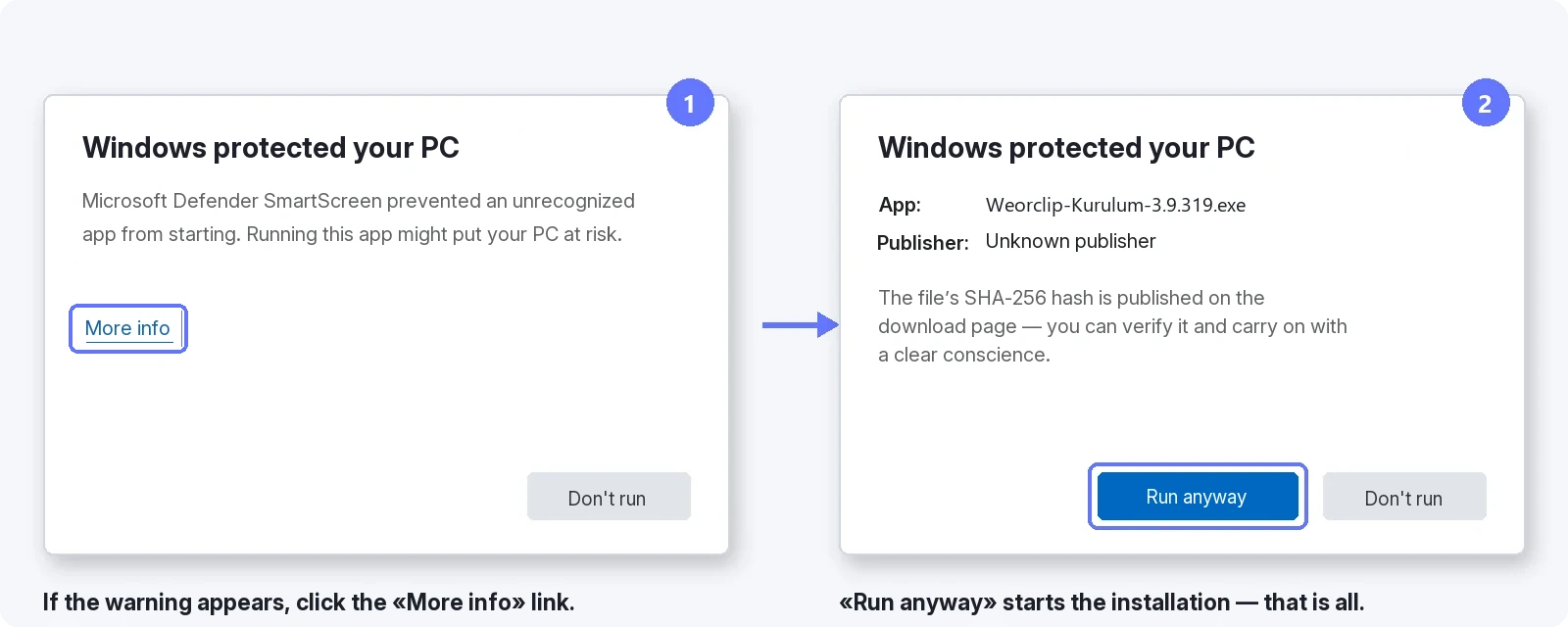
If you want to verify the file you downloaded, here is its SHA-256 digest:
c8da9b70a5b06d799ccf49ee47a97d715075f5bc641b3fd44f620ace9db6241e
To check it yourself, in PowerShell:
Get-FileHash .\Weorclip-Kurulum.exe
If the output matches the hash above, the file is intact.
For an independent check: VirusTotal scan report → — the verdict of more than 70 antivirus engines on the same file.
Extra components download once, during setup, according to the installation type you pick; the app never downloads components on its own afterwards.
Installation types
Both the setup screen and the app come in 13 languages. Setup offers three paths; every component is listed with a description and its approximate size, and you untick whatever you don’t want.
Full — every feature comes ticked: about 16 GB to download, about 21 GB on disk.
Light — downloading and editing only: about 150 MB to download, about 350 MB on disk.
Custom — you pick the components one by one.
A Full installation brings: automatic subtitles (~600 MB), audio cleanup, audio separation (~1 GB), read-aloud and dubbing (~9 GB on a computer with a graphics card), offline translation (~2.5 GB), smart subtitles and AI editing (~2.8 GB), object tracking, face tracking and smart framing, and speaker colours.
If you later want a feature you didn’t install, the app tells you and its «Open setup» button opens the installer with that component already ticked.
Browser extension
The optional extension for Edge or Chrome lets you right-click a video to download it and capture clips straight from the browser; the app works without it too. An illustrated guide opens at the end of setup, and if you want to install it later, the «Install the browser extension» shortcut stays in the Start menu. If the extension also needs refreshing after an update, the app shows a «Reload the extension» prompt.
If you uninstall
Uninstalling removes the app, its engines and its models completely. It asks separately about your live-capture clips and the sign-ins and saved projects inside the app: say no and they stay on your computer, so you can pick up where you left off if you reinstall.